The Apple Notes alternative built for salespeople
Senaro AI is the task manager built for salespeople, with account tiles, sales-native tags, and invisible AI on day one. Apple Notes is a great notes app, just not built for sales work.
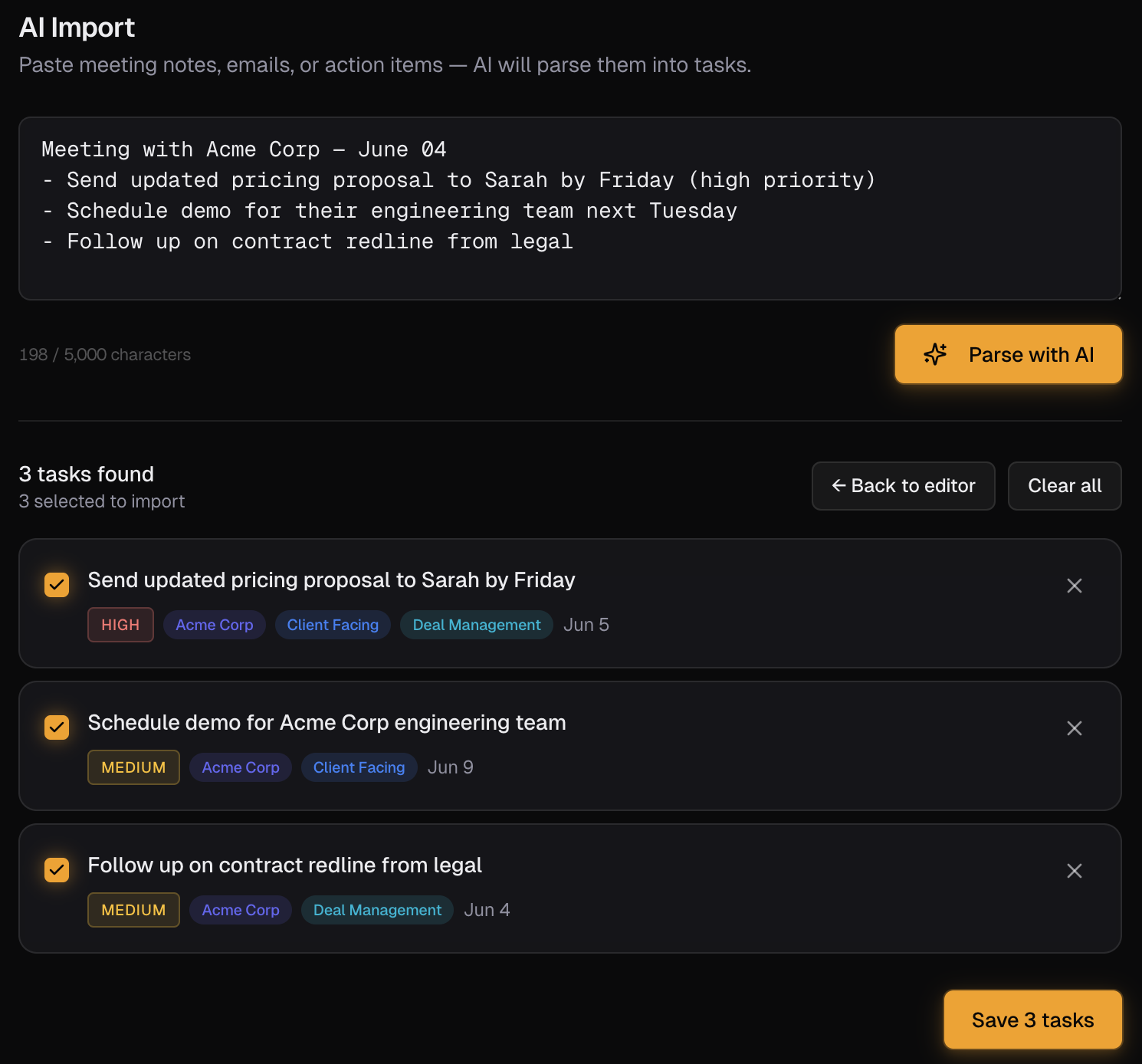
Apple Notes is where most reps actually keep their follow-ups, and also where those follow-ups quietly die. Senaro AI keeps the same one-line capture speed but files each task to the right account, sets a due date, and surfaces it when it matters. It is the structured version of the Notes habit you already have.
Why salespeople look for Apple Notes alternatives
- Nothing surfaces. A follow-up typed into Notes sits there silently until you happen to scroll past it, which is exactly how things slip.
- There is no due date that nags, no urgency, no sorted plan. Notes never tells you what to do next.
- There is no concept of accounts. Your Acme follow-ups are scattered across three notes and a checklist, never rolled up in one place.
- No AI. Notes will never read 'send the recap to Acme by Friday' and turn it into a dated, tagged, account-filed task.
- Recall is the whole problem. The reason reps lose deals is that the note existed but never resurfaced at the right moment.
Senaro AI vs Apple Notes at a glance
| Dimension | Apple Notes | Senaro AI |
|---|---|---|
| Built for | Fast, unstructured capture | Salespeople who must not drop follow-ups |
| Surfacing what matters | Nothing. You scroll and hope | A sorted plan every morning across all accounts |
| Accounts and deals | None. Follow-ups scattered across notes | Account tiles. Every task on a deal in one place |
| Due dates and urgency | None that remind you | Due dates and urgency that map to deal stage |
| AI | None | Paste your notes into AI Import, get a structured task list back |
| Pricing | Free, bundled with Apple devices | Free forever plan. Pro $11/month or $99/year, 14-day Pro trial |
How they actually differ
The pipeline-in-Notes problem
Ask a room of reps where their follow-ups live and a large share will say Apple Notes. It is fast, it is always there, and it never gets in the way. That is exactly why it fails them. A follow-up in Notes has no due date, no owner, no account, and no way to resurface. It is a message in a bottle.
Senaro AI is built for people who like that capture speed but are tired of paying for it on Friday afternoon. You still type one line. The difference is that the line becomes a dated, tagged task filed to the right account and dropped into a sorted plan.
Keep the speed, add the recall
The point is not to make reps work harder than they do in Notes. It is to make the same keystroke do more. Type 'send renewal proposal to Acme by Monday, high priority' and Senaro files it to the Acme tile, sets Monday, marks it urgent and client-facing.
When you have a week of notes to clear, AI Import takes the whole block at once and hands back a structured list filed to accounts. The Notes habit, minus the part where deals quietly get smaller because something slipped.
Who should switch (and who should stay)
Switch to Senaro AI if
- Reps who genuinely run their pipeline out of Apple Notes and know things slip
- Anyone who likes one-line capture but needs follow-ups to resurface
- Salespeople who want account rollup without changing how fast they capture
Stay with Apple Notes if
- People using Notes for actual notes and reference material, not task tracking
- Anyone whose follow-ups genuinely never slip (rare)
- Users who do not work in accounts or deals
How to move from Apple Notes
Moving off Notes is the easiest migration there is. Open AI Import, paste the notes where your follow-ups live as one block, and Senaro returns a structured task list filed to accounts. Set up your account tiles in five minutes first using the role-aware starter template, and you are running on Senaro in one sitting.
Frequently asked questions
Why not just keep using Apple Notes?
Because Notes never tells you what to do next. A follow-up typed into Notes has no due date, no account, and no way to resurface, which is exactly why things slip. Senaro AI keeps the same fast capture but files, dates, and surfaces each task.
Is Senaro AI as fast to capture as Notes?
That is the design goal. You type one line and hit enter. The difference is what happens next: the line becomes a dated, tagged task filed to the right account, rather than a line you have to find again later.
Can I move my existing notes into Senaro AI?
Yes, and it is the easiest part. Paste the notes where your follow-ups live into AI Import as one block, and the parser returns a structured task list filed to accounts.
Does Senaro AI work on iPhone like Notes does?
Yes. Senaro AI is fully optimised for iPhone Safari with a bottom tab bar and mobile-safe dialogs, so on-the-go capture feels close to the Notes habit you already have.
Do I need to connect a CRM?
No. Senaro AI is standalone from day one. Use it alongside Salesforce or HubSpot, or without any CRM at all.
Is my data safe?
Yes. Encrypted in transit and at rest. Customer data is never used to train AI models. Only task text is sent to our AI provider for parsing, and you can pause AI processing at any time in Settings.
Keep comparing
Weighing up more than one tool? Read our ranked guides to the best sales task managers and the best free task managers.
Or see how Senaro AI compares to Todoist, HubSpot Tasks, Salesforce Tasks, Notion and Motion.
Ready to stop dropping follow-ups?
14 days of Pro, no card. Drops to Free after if you do nothing.
Built by Arjun Sinha. 13+ years on the sales front line before founding Senaro AI, including AE, Sales Leadership, and GTM Consulting at Series A+ SaaS companies. Senaro AI is built around how a sales day actually flows, not how a product manager imagines one does.