The Todoist alternative built for salespeople
Senaro AI is the task manager built for salespeople, with account tiles, sales-native tags, and invisible AI on day one. Todoist is a great general-purpose task manager, just not built for sales work.
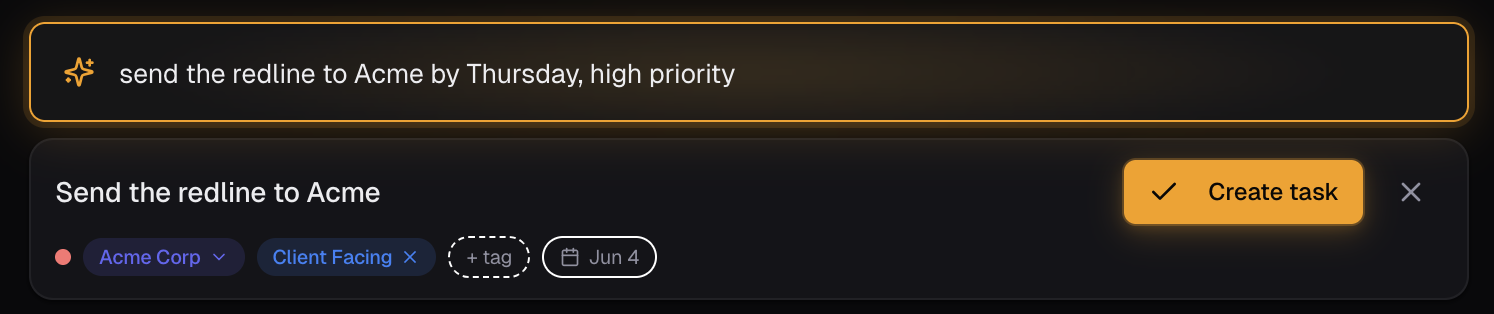
Todoist is a great general-purpose to-do app. Senaro AI is a task manager built specifically for salespeople, with sales-native concepts (accounts, tiles, client-facing tags) on day one and invisible AI that files tasks to the right account without you setting anything up.
Why salespeople look for Todoist alternatives
- It does not understand accounts. Every task is just a task. To track work by deal, you have to build a project per account by hand and remember to file each task into the right one.
- There is no concept of urgency by deal stage. A renewal in 30 days and a personal errand in 30 days look identical.
- Tags and labels are powerful but unopinionated. You have to invent your own taxonomy for client-facing work, CRM admin, prospecting, and so on, and keep it consistent yourself.
- Its AI features (Todoist AI Assistant) sit on top of generic productivity, not sales workflow. They cannot tell that 'send the recap to Acme' belongs on the Acme tile.
- The Friday-afternoon meeting-notes problem is unsolved. There is no bulk paste-block flow that turns a meeting note into a structured task list filed to the right accounts.
Senaro AI vs Todoist at a glance
| Dimension | Todoist | Senaro AI |
|---|---|---|
| Built for | General productivity, all professions | Salespeople (AEs, SDRs, CSMs, sales leaders as ICs) |
| Accounts and deals | Manual: build a project per account | Account tiles built in. Every task ties to an account in one click or via AI |
| AI | Generic AI Assistant, sits on top | Invisible AI. Type 'send proposal to Sarah at Acme by Friday', it files to the Acme tile with due date and tag |
| Tagging system | Build your own labels | Sales-native tags out of the box (Client Facing, CRM Admin, Deal Mgmt, Prospecting, etc.), plus unlimited custom tags on Pro |
| Bulk capture from meeting notes | Not supported | AI Import: paste a meeting note, get a structured task list back filed to accounts |
| Follow-up suggestions | None | Complete a client-facing task, get an AI-suggested next step you can accept in one click |
| Tile-per-account view | Filter by project / label | Every open task on a deal in one place. QBR or forecast prep in 30 seconds |
| Free plan | Limited projects, no reminders on free | Free forever. 25 AI credits/month, 5 account tiles, all views |
| Pricing | Pro $5/month, Business $8/user/month | Pro $11/month or $99/year. 14-day Pro trial automatic, no card |
How they actually differ
How the AI actually feels
Todoist's natural-language parser is genuinely good at dates. Type 'tomorrow at 3pm' and it gets the date right. What it does not do is understand the rest of the sentence. 'Send the recap to Acme about pricing pushback' becomes a task called 'Send the recap to Acme about pricing pushback' with a due date if you typed one. It will not tag the work as client-facing, will not file it under an Acme account, and will not flag it as time-sensitive because of the deal stage.
Senaro AI reads the same sentence and silently puts it on the Acme tile, tags it as client-facing, sets the due date, and routes it into your sorted plan. You did not pick a project. You did not pick a label. The product knew.
Why account tiles matter for sales
Salespeople do not work in projects. They work in accounts. Every account has its own rhythm of follow-ups, renewals, redlines, and recaps, and the rep needs to see all of it in one place before a forecast call or a QBR.
In Todoist you can simulate this by creating a project per account, but you have to do it manually, remember to file every task into the right project, and the tool does nothing to help you when you type a task in a hurry. Within a quarter the system has decayed and half your work lives in the inbox.
Senaro's account tiles are the primary structure. The AI files to them automatically. The tile view shows every open task on a deal, which is the actual artefact a rep needs in real life.
The Friday-afternoon meeting-note problem
Every rep has the same Friday-afternoon problem. You have five days of meeting notes, half a dozen call recaps in a Notes app, and a stack of follow-ups that need to be filed somewhere before Monday. Todoist gives you a fast input box and a parser. You still have to read each line, decide which account it belongs to, type it back in, set a due date and a label.
Senaro's AI Import takes the entire block of notes as one paste, returns a structured task list with accounts, due dates, and tags filled in. You skim the list, fix the one or two it got slightly wrong, and you are done in five minutes.
Pricing in context
Todoist Pro is cheaper per month. That is a real point in its favour for personal use. The question is what the price is buying. Todoist Pro at $5 buys you more projects and reminders. Senaro Pro at $11 buys you a tool that already knows what an account is, an AI that files tasks for you, AI follow-up suggestions on client-facing work, and full historical analytics.
If you are choosing between them as a salesperson, the relevant comparison is not $5 vs $11. It is the time you would spend bending Todoist into a sales workflow vs picking up a tool already shaped to one. Most reps will save the $6 difference in the first half hour of a Monday.
Who should switch (and who should stay)
Switch to Senaro AI if
- AEs running 5 to 30 active accounts who keep dropping follow-ups
- SDRs whose side-tasks live outside Outreach or Salesloft and end up in Apple Notes
- CSMs juggling 30 to 80 accounts with renewal, expansion and health work that needs different urgency rhythms
- Reps who tried to build a sales workflow in Todoist and found it decayed within a quarter
Stay with Todoist if
- People using Todoist for personal life admin alongside work and happy with it
- Anyone whose work is not account-based (engineers, designers, writers tracking shipping work)
- Reps whose company already mandates a different tool they actively like
How to move from Todoist
There is no automated import from Todoist yet. The path most reps take: keep Todoist for personal tasks if you want, set up your account tiles in Senaro in five minutes using the role-aware starter template (AE / SDR / CSM), then paste your active follow-ups into AI Import as a single block and let the parser file them. Most reps are running on Senaro by the end of the first session.
Frequently asked questions
Is Senaro AI a direct replacement for Todoist?
Only if you were using Todoist for sales work. If you use Todoist for personal life admin (groceries, errands, recurring household tasks), keep it. Senaro AI is built specifically for sales tasks tied to accounts and deals.
Why is Senaro AI more expensive than Todoist Pro?
Todoist Pro at $5/month is a great price for general productivity. Senaro AI Pro at $11/month is built for one job: helping salespeople not drop follow-ups. The price includes invisible AI that files tasks to accounts, AI Import for meeting notes, AI follow-up suggestions on client-facing tasks, and full historical analytics. Different product, different job.
Can I import my Todoist tasks into Senaro AI?
There is no automated Todoist importer today. Most reps paste their active follow-ups into AI Import as a single block, and the parser files them to accounts in one pass. Setup is usually done in one sitting.
Does Senaro AI work on mobile?
Yes. Senaro AI is fully optimised for iPhone Safari with a bottom tab bar and mobile-safe dialogs. Add tasks on the go, review your sorted plan, and check your account tiles from the phone.
Do I need to connect a CRM?
No. Senaro AI is standalone from day one. You can use it alongside Salesforce or HubSpot, or without any CRM at all.
Is my data safe?
Yes. Encrypted in transit and at rest. Customer data is never used to train AI models. Only task text is sent to our AI provider for parsing, never your account data, and you can pause AI processing at any time in Settings.
Keep comparing
Weighing up more than one tool? Read our ranked guides to the best sales task managers and the best free task managers.
Or see how Senaro AI compares to HubSpot Tasks, Salesforce Tasks, Notion, Motion and TickTick.
Ready to stop dropping follow-ups?
14 days of Pro, no card. Drops to Free after if you do nothing.
Built by Arjun Sinha. 13+ years on the sales front line before founding Senaro AI, including AE, Sales Leadership, and GTM Consulting at Series A+ SaaS companies. Senaro AI is built around how a sales day actually flows, not how a product manager imagines one does.