The HubSpot Tasks alternative built for salespeople
Senaro AI is the task manager built for salespeople, with account tiles, sales-native tags, and invisible AI on day one. HubSpot Tasks is a great crm-native task tracker, just not built for sales work.
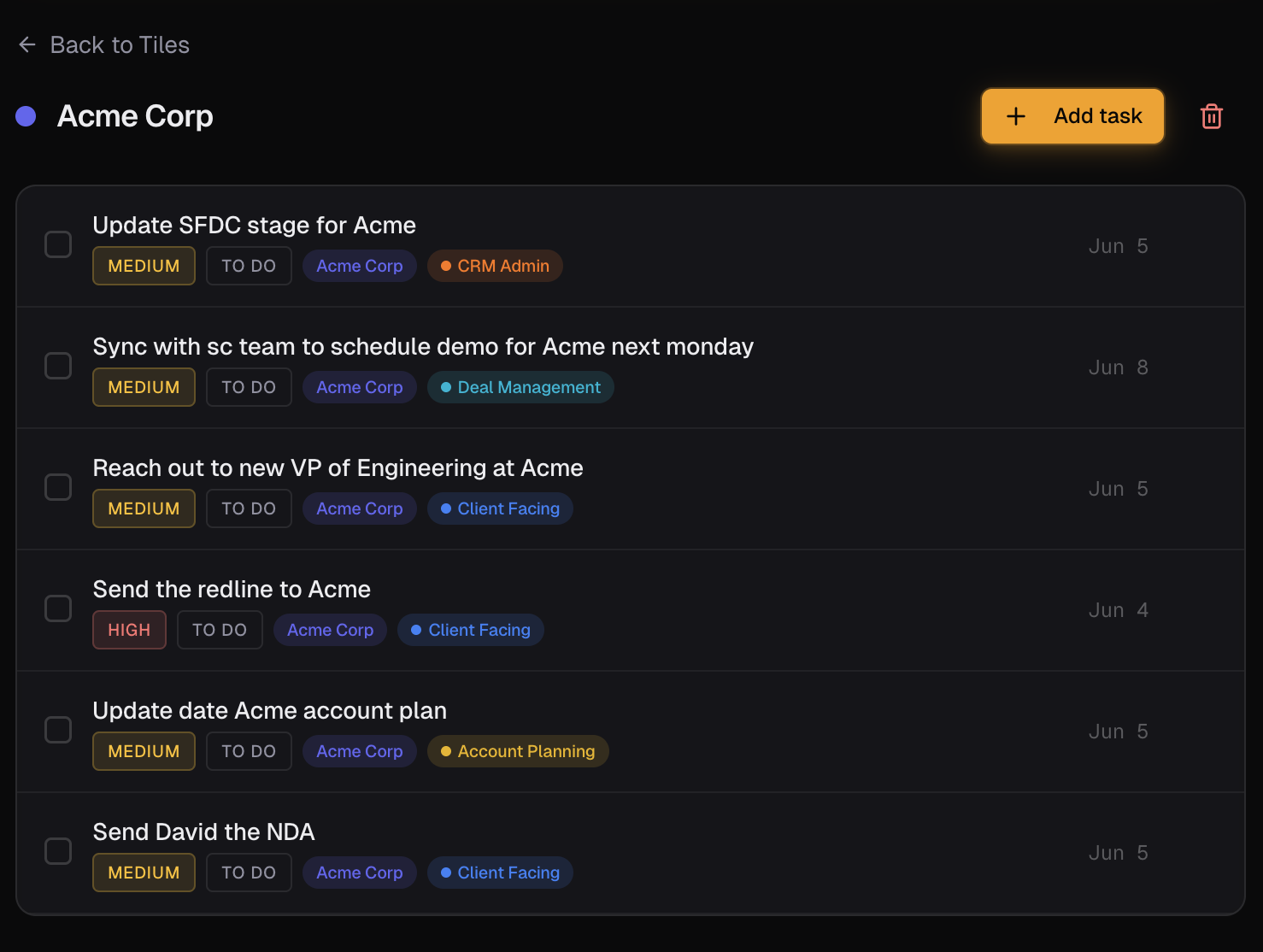
HubSpot Tasks is fine for the manager. Senaro AI is built for the rep. Use Senaro as your personal task layer alongside HubSpot, type a follow-up the way you would say it out loud, and let the AI file it to the right account.
Why salespeople look for HubSpot Tasks alternatives
- The task UX is built for completeness, not speed. Adding a task means opening a panel, picking an associated contact or deal, setting a type, and saving. Reps in the middle of a call do not open HubSpot to log a follow-up. They open Notes.
- It is built for the manager. Tasks exist so activity reports populate. The rep gets none of the upside; they get a logging chore.
- AI features sit on top of the CRM data model, not on top of how a rep actually types. You cannot paste a meeting note and get a structured task list filed to the right accounts in seconds.
- There is no real concept of urgency by deal stage in the task list itself. Tasks sort by due date, full stop.
- Reps end up running their actual day from Notes or sticky notes and only filling HubSpot afterwards, which means follow-ups still slip in the gap.
Senaro AI vs HubSpot Tasks at a glance
| Dimension | HubSpot Tasks | Senaro AI |
|---|---|---|
| Built for | Sales managers and CRM admins | Salespeople (AEs, SDRs, CSMs, sales managers as ICs) |
| Speed of entry | Panel-based form with required fields | Single input. Type a sentence, hit Enter, AI fills the rest |
| AI parsing | AI features sit on top of CRM data model | Invisible AI. Reads your sentence and files to the right account, due date, and tag |
| Accounts and deals | Tied to CRM contact and deal records | Account tiles built in. No CRM dependency |
| Tagging system | Custom activity types, configured by admin | Sales-native tags out of the box (Client Facing, CRM Admin, Deal Mgmt, Prospecting, etc.), plus unlimited custom tags on Pro |
| Bulk capture from meeting notes | Not supported | AI Import: paste a meeting note, get a structured task list back filed to accounts |
| Follow-up suggestions | None on the task itself | Complete a client-facing task, get an AI-suggested next step in one click |
| Manager visibility | Full reporting to manager dashboards | Personal account. Manager cannot see your private task list |
| Pricing | Bundled with Sales Hub. Starter $20+/seat/month, Pro $100+/seat/month | $11/month or $99/year. 14-day Pro trial automatic, no card |
How they actually differ
Senaro is a personal layer, not a CRM replacement
HubSpot Tasks is part of the company's CRM. Your manager configured it, your activity flows into it, and your reporting depends on it. That is not changing. Senaro does not try to replace any of that.
Senaro is the personal task layer you sit beside HubSpot. The follow-ups you'd otherwise type into Notes go into Senaro instead. When work is done, you update HubSpot if your process requires it. The point is to stop dropping things in the gap between a call ending and the CRM getting updated.
How the AI actually feels
In HubSpot, logging a follow-up means picking the contact, choosing a task type, setting a date, and saving. The schema is tight because reporting needs structure. That is the right trade-off for the manager and the wrong one for the rep mid-call.
In Senaro you type 'send Sarah the redline by Thursday, high priority, Acme'. Done. The AI files it to the Acme tile, marks it client-facing, sets the due date and urgency. You did not open a panel. You did not pick a type. The product knew.
The privacy of a personal task list
Tasks in HubSpot are visible to your manager by default. That is the point of CRM tasks. For real follow-ups against a deal, fine. For your personal triage list of '15 things on my mind right now', not fine.
Senaro is a personal account. Your task list is yours. You decide what gets pushed back to the CRM and when. Most reps keep their messy thinking in Senaro and only the cleaned-up work in HubSpot.
Pricing in context
HubSpot Tasks are bundled with Sales Hub, so most reps do not see the line item. That does not mean the tool fits, just that the cost is hidden.
Senaro at $11/month is paid by the rep, on a personal card, below any procurement threshold. It is a personal productivity purchase, not an IT project. The 14-day Pro trial is automatic so the decision is low-risk.
Who should switch (and who should stay)
Switch to Senaro AI if
- AEs already on HubSpot who run their actual day from Notes because the CRM task UX is too slow
- SDRs whose side-tasks live outside HubSpot sequences and end up in scratch tabs
- CSMs juggling renewal, expansion, and health work that needs different urgency rhythms
- Reps who want a private task layer their manager does not see by default
Stay with HubSpot Tasks if
- Teams whose internal process strictly requires every task to live as a HubSpot CRM record from the moment it is created
- Reps who already love the HubSpot task UX and never miss follow-ups
- Anyone whose company has banned non-approved SaaS for sales activity tracking
How to move from HubSpot Tasks
Most reps run Senaro and HubSpot side by side. Keep HubSpot for what it is good at (reporting, the company view of the deal, contact records). Set up Senaro account tiles in five minutes using the AE / SDR / CSM starter template, then use the quick-add bar and AI Import to capture every follow-up in plain English. You decide which items get pushed back into HubSpot tasks if your process requires that.
Frequently asked questions
Does Senaro AI replace HubSpot?
No. HubSpot is your CRM and your manager's reporting tool. Senaro is your personal task layer. They sit side by side and do different jobs.
Does Senaro AI integrate with HubSpot?
Not today. Senaro is standalone by design, so you can start using it in minutes without an IT conversation. CRM integration is on the roadmap; in the meantime most reps use both tools in parallel and update HubSpot when their internal process requires it.
Can my manager see my Senaro tasks?
No. Senaro is a single-user account that you pay for on your personal card. There are no team workspaces, no manager dashboards, and no admin console in the current product. Your task list is yours.
Is the price worth it if HubSpot Tasks is free with my CRM?
Different products doing different jobs. HubSpot Tasks is built for completeness and reporting. Senaro is built for speed of capture and a sorted day. Most reps decide in the first half hour of a Monday whether $11 a month is worth not dropping follow-ups.
Does Senaro AI work on mobile?
Yes. Senaro AI is fully optimised for iPhone Safari with a bottom tab bar and mobile-safe dialogs. Capture a follow-up on the way out of a meeting, review your sorted plan, and check your account tiles from the phone.
Is my data safe?
Yes. Encrypted in transit and at rest. Customer data is never used to train AI models. Only task text is sent to our AI provider for parsing, never your account data, and you can pause AI processing at any time in Settings.
Keep comparing
Weighing up more than one tool? Read our ranked guides to the best sales task managers and the best free task managers.
Or see how Senaro AI compares to Todoist, Salesforce Tasks, Notion, Motion and TickTick.
Ready to stop dropping follow-ups?
14 days of Pro, no card. Drops to Free after if you do nothing.
Built by Arjun Sinha. 13+ years on the sales front line before founding Senaro AI, including AE, Sales Leadership, and GTM Consulting at Series A+ SaaS companies. Senaro AI is built around how a sales day actually flows, not how a product manager imagines one does.